Phone Number Tracker
- 3.8
- Rating
- 1.00M
- Installs
- Free
- Price
 Analysis by App-foxy
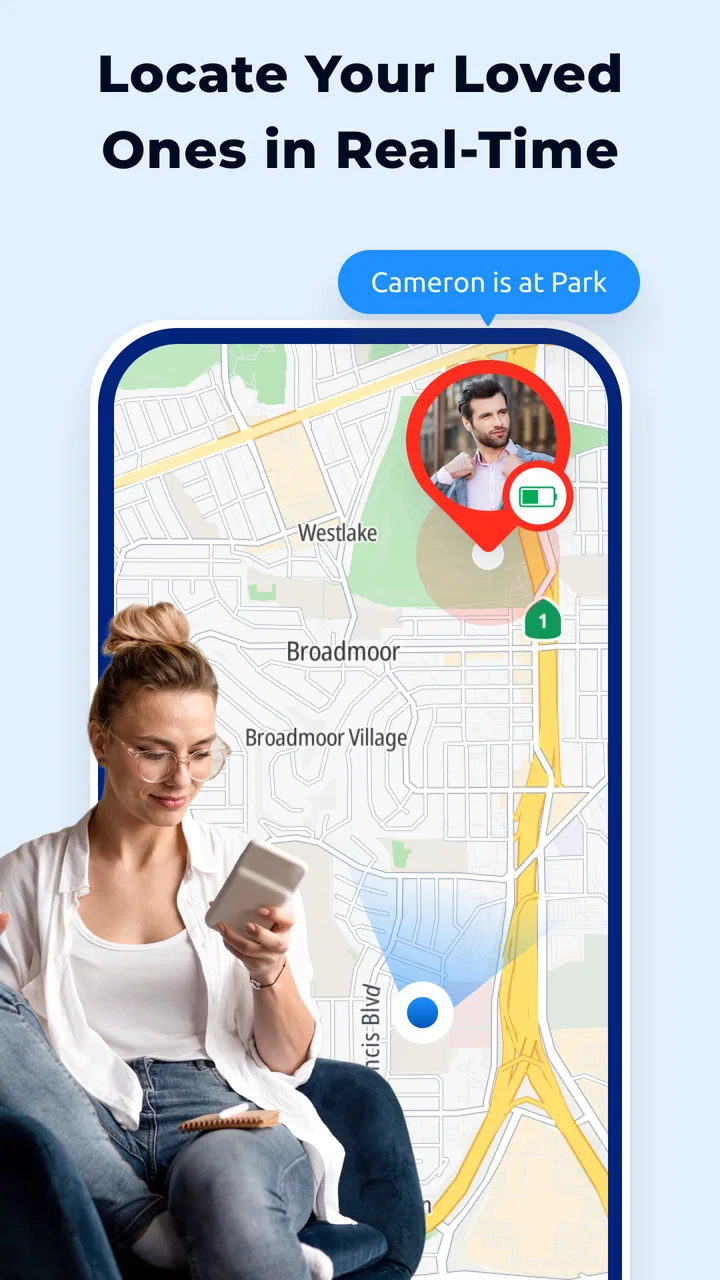
Phone Number Tracker is a free Maps & Navigation app from GENERATIONZTECH LIMITED built around one clear idea: helping you locate family members through a phone number. I approached it as a practical location tool rather than a full navigation replacement, and that distinction matters. Its appeal is not mainly about finding a restaurant or planning a driving route; it is about reducing uncertainty when someone you care about is away from home.
The central capability sounds simple, but the real value depends on how comfortably everyone involved uses it. A location tracker only helps when the people being located understand the arrangement and participate willingly. Used that way, it can become a convenient check-in tool for families. Used as a substitute for communication or consent, it is the wrong kind of solution. The useful question is not whether a phone number can magically solve every location problem, but whether this app fits a shared family routine.
What the phone-number tracking idea changes
Most navigation apps begin with a map, a destination, or a route. Phone Number Tracker begins with a person. That shift makes it more relevant when I want to know where a family member is, rather than where a place is. The store summary presents it as a real-time location tracker for finding family location with phone number tracking, so the intended use is personal coordination, not professional fleet management or turn-by-turn navigation.
You May Also Like

 Blood Strike: 2.5 Anniversary
Blood Strike’s Loadouts Turn Every Drop Into a Tactical Gamble
A close look at Blood Strike’s custom loadouts: how fast access to signature weapons reshapes its battle royale rhythm, rewards preparation, and narrows the gap between fights.

 Pandora - Music & Podcasts
Pandora’s Music Is Easy to Start, but Harder to Recover
Pandora’s strength is its low-effort path from a seed to a station. Its weak spot is how much confidence it asks you to place in connection, setup, and quiet recovery.

 8 Ball Pool
 Is Built on Rivalries, Rematches, and Routine
A close look at the rivalries, rematches, shared routines, and unanswered safety questions that turn a quick pool match into a persistent mobile community.

 Samsung Music
’s Quiet Strength Is Playing What You Already Own
Its reach comes less from spectacle than from dependable access to a personal library. That simplicity is both the app’s strongest retention engine and its ceiling.

 AccuWeather: Weather Radar
AccuWeather Review: A Quick, Clear Forecast for Everyday Decisions
For everyday plans, the best forecast is the one you can understand quickly. AccuWeather makes rain timing, radar, and local conditions easy to act on, with a few trade-offs.

 Hill Climb Racing
Why Hill Climb Racing Still Turns Crashes Into One More Run
A tiny car, a bumpy hill and one more upgrade: Hill Climb Racing keeps resurfacing because its simple chaos makes every near-miss feel personal.
More From Our News Desk



In everyday terms, the phone number acts as the starting point for the lookup. That can feel more approachable than asking a less technical relative to create a complicated account, remember a username, or manage several map-sharing settings. For a family that already communicates mainly by phone, the concept is easy to understand: identify the person through the number and use the location experience when a check-in is needed.
That convenience should not be confused with unlimited precision or universal access. A phone number is an identifier, not a guarantee that a person can be located at every moment. The result still depends on the other phone, its connection, the person’s participation, and the way the app handles the request. I would explain that clearly before introducing it to a parent, child, partner, or older relative.
The app’s Everyone content rating makes it approachable for a broad household audience, but an age label does not remove the need for a family agreement. I would set expectations first: who may request a location, when location sharing is appropriate, and what to do if the information looks old or unavailable. That conversation is as important as installing the app.
A focused tool rather than a complete navigation suite
Phone Number Tracker makes the most sense beside ordinary map apps, not necessarily instead of them. A conventional maps service is usually better when I need route planning, traffic context, business information, walking directions, or a detailed trip overview. This app’s narrower purpose is person-centered tracking. If my main goal is to reach an address, I would open a standard navigation app. If my main concern is whether a family member has arrived or where they are during a journey, this app is more directly aligned with that question.
That focus can be a strength because it avoids turning a simple family check-in into a large navigation workflow. It can also be a limitation because users looking for a complete map ecosystem may find the experience less versatile than the apps already built into their phones. I would not install it expecting a replacement for every mapping need.
How I would use it in practice
The first step is setting up a shared routine, not simply pressing a tracking button. I would install the app, identify the family member involved, and make sure that person understands what the request means. I would also decide whether the app is for occasional reassurance, planned arrivals, or a recurring household habit. A narrow purpose usually produces fewer misunderstandings than vague, constant monitoring.
When a location request is useful, I would keep the surrounding conversation simple. For example, if someone is travelling home after work, the person waiting could check the app instead of sending several messages asking for an update. If the location does not refresh promptly, the next step should be a normal call or message rather than repeated requests. This is a key practical trade-off: tracking can reduce unnecessary interruptions, but it should not replace direct contact when safety is genuinely in question.
I would also treat the displayed position as a moment in time, not an absolute promise about where the person is now. A moving phone can change position between updates, and a person may leave the device somewhere else. That means the app is better for orientation and reassurance than for making high-stakes assumptions. If someone says they are already home, I would not use a map point alone to challenge that statement.
One useful habit is to agree on a backup action before anyone needs it. If the location cannot be viewed, the family member can send a message, share an arrival note, or make a call. This prevents the common mistake of treating a tracking app as the only communication channel. It also helps less confident users feel that a temporary technical problem is manageable rather than alarming.
An everyday family scenario
Imagine a teenager travelling home while a parent is preparing dinner. The parent does not want to send repeated “Where are you?” messages, and the teenager does not want to stop walking to reply. With an agreed tracking routine, the parent can check the family member’s location and get a general sense of progress. If the person appears to be near the expected area, the parent can wait. If the location does not change for an unusually long time, a call becomes the sensible next step.
That scenario shows the app’s strongest practical effect: it can lower the amount of small, repetitive communication needed during ordinary journeys. It does not eliminate uncertainty, and it does not prove that someone is safe. It simply gives the family another piece of context. In my view, that is a more realistic and healthier way to use it than expecting constant surveillance.
A second useful scenario involves a family member who is not comfortable describing locations verbally. Asking someone to read out a street name can be frustrating, especially if they are unfamiliar with the area. A location-focused app may make the conversation easier by giving the other person a visual reference. Even then, I would use a call if the situation seemed confusing or urgent.
Practical habits that make the feature more useful
Before relying on the app during a busy day, I would test the family workflow when everyone is calm. Confirm that each person knows whose number is being used, what a successful result looks like, and how to respond if the location seems outdated. This small rehearsal is more valuable than discovering a setup problem when somebody is already late.
I would keep the app’s role specific. For planned trips, use it as a check-in layer. For emergencies, contact emergency services or the person directly rather than waiting for a map result. For children, combine it with an age-appropriate conversation about privacy. For older relatives, write down the simplest possible backup instruction, such as calling a named family member if the app is confusing.
Another non-obvious trade-off is emotional rather than technical. Frequent checking can reassure one person while making another feel watched. A family agreement should therefore include reasonable boundaries, such as checking during travel windows instead of opening the app constantly. The same feature that reduces anxiety for a parent can create tension for a teenager or partner if it is used without clear limits.
Because the app is free to download, it is easy to try without an upfront payment. However, the presence of in-app purchases ranging from $4.99 to $39.99 per item means I would review any paid prompt carefully before confirming it. I would not assume that every useful action is included at no cost, and I would make sure the person managing the device understands what a purchase screen is offering.
Where the experience involves trade-offs
The rating sits at an average of 3.8 from around 1.9 thousand ratings, which suggests a mixed but meaningful user response rather than universal approval. I read that as a reason to approach the app with practical expectations. The concept is easy to understand, but location tools can feel inconsistent when the surrounding conditions are not ideal. A good idea does not automatically produce a dependable answer every time.
The app has passed one million installs, so it is not an obscure experiment with no audience. Still, popularity does not tell me whether it will suit a particular family. The important test is whether the phone-number workflow feels clearer than the alternatives already available to the people I want to connect with. If everyone is already comfortable with an established family location feature, adding another app may create more confusion than value.
There is also a privacy trade-off that deserves direct attention. A phone number is personal information, and location is sensitive information. I would avoid entering someone else’s number without their knowledge, and I would not use the app to track a colleague, acquaintance, or partner secretly. The product’s family-oriented positioning makes consent especially important because trust is part of the feature’s usefulness.
Another limitation is that the app should not be treated as a precision safety instrument. A location point can help with context, but it is not the same as speaking to someone. If a family member is missing, injured, or in immediate danger, I would call them and seek appropriate help. I would never let a delayed or unavailable location result postpone an urgent response.
Compatibility and cost considerations
The current version is 2.0.4, and the app supports devices running Android 7.0 or later. That makes it relevant to many Android users, including people who keep an older phone for a parent or family member. Before planning a household rollout, I would check every participating device rather than assuming that an older handset will behave exactly like a newer one.
Since the app is listed as free, the initial barrier is low. The more important cost question is whether optional purchases match the way the family intends to use it. With individual in-app items priced between $4.99 and $39.99, I would avoid buying anything until I understood whether it solves a real problem in our routine. A paid option may be worthwhile for one household and unnecessary for another.
I would also pay attention to the everyday friction of maintaining another app. Every additional app means another icon, another interface to explain, and another place where a user might become confused. For a technically confident family, that may be minor. For someone who already struggles with smartphones, the phone-number concept is helpful only if the rest of the experience remains easy enough to follow.
When a different option is better
I would skip Phone Number Tracker if I mainly need driving directions, public transport information, traffic avoidance, or place discovery. Those jobs belong to a conventional maps and navigation service. I would also look elsewhere if my household already has a trusted location-sharing arrangement that everyone understands. Redundancy can make people wonder which app is showing the current information.
I would be cautious about using it for professional tracking, company vehicles, deliveries, or groups of unrelated people. The app is presented around family location, and a family workflow is very different from a managed fleet system with formal reporting and administrative controls. Choosing a tool outside its natural purpose often creates expectations it was never meant to meet.
It may also be a poor fit for someone who wants complete independence from phone-based tracking. If a family member is uncomfortable sharing their location, pushing them into the arrangement can damage trust. In that case, scheduled calls or voluntary check-in messages may be better, even if they are less convenient. The best tracking tool is one that the people involved willingly use.
Who gets the most value from it
I see the greatest benefit for families that need occasional reassurance during commutes, school journeys, visits, or errands. It can be particularly useful when one person prefers not to send constant updates and another person wants a quick way to understand whether the journey is progressing normally. The phone-number focus may also appeal to households that find account-heavy location services intimidating.
Parents should think of it as a conversation aid and a check-in tool, not as a substitute for teaching children what to do when plans change. Partners should agree on boundaries before using it. Adult children supporting an older parent may appreciate the simpler identity model, but they should still provide a backup plan for calls and make sure the relative is comfortable with the arrangement.
The developer, GENERATIONZTECH LIMITED, places this product in a category where trust and clarity matter as much as map presentation. My recommendation would therefore depend less on whether the feature sounds impressive and more on whether the household can use it respectfully. A clear agreement, a test run, and a backup communication method will make a larger difference than checking the map repeatedly.
After using the concept as a family-location aid, I would describe Phone Number Tracker as a focused option with a clear everyday purpose. It can make routine travel updates less annoying and give families another way to orient themselves when someone is on the move. At the same time, it is not a universal navigation replacement, not a guarantee of safety, and not an excuse to monitor people without consent.
My recommendation is to try it when the household wants a simple, person-centered check-in workflow and is willing to set boundaries around privacy and expectations. The free entry point makes experimentation straightforward, while the optional purchases deserve careful attention. If your needs are ordinary route planning or detailed navigation, stay with a standard maps app. If your need is occasional family location context, Phone Number Tracker may earn a place on your phone, provided everyone using it understands exactly what it can—and cannot—do.
FAQs for Phone Number Tracker
01What is Phone Number Tracker and how does it work?
Phone Number Tracker is designed to provide information associated with a telephone number, such as its country, region, carrier, or approximate location, depending on the available data and the app’s permissions. During testing, it was important to understand that the service does not magically reveal a person’s exact real-time position. Results generally come from public databases, network information, or user-provided data, so accuracy can vary significantly.
02Can Phone Number Tracker show the exact live location of another person?
No, users should not expect Phone Number Tracker to display an exact live location simply by entering someone’s phone number. A phone number alone is normally insufficient for precise GPS tracking, and accessing another person’s location requires their consent and, in many cases, location sharing enabled on their device. The app is better viewed as a number-identification or approximate-location tool rather than a covert tracking solution.
03Does Phone Number Tracker require permission to access my location or contacts?
Depending on the version and features available, Phone Number Tracker may request access to location services, contacts, phone information, or network data. These permissions should be reviewed carefully before accepting them. Location access may be used to support regional searches, while contact access can help identify numbers stored on the device. You can usually manage or revoke permissions through Android or iOS privacy settings.
04Is Phone Number Tracker free to use, or does it include paid features?
The basic download may be free, but Phone Number Tracker can include advertising, usage limitations, subscriptions, or in-app purchases for extended searches and additional information. Before starting a trial or entering payment details, check the current pricing, renewal terms, and cancellation process in the relevant app store. Some features may also be restricted by country, database coverage, or the type of number being searched.
05Is it legal and safe to use Phone Number Tracker?
Using Phone Number Tracker to identify your own number, check an unknown caller, or locate publicly available regional information is generally less problematic. However, attempting to monitor another person without permission may violate privacy laws, app policies, or local regulations. Avoid entering sensitive personal data unnecessarily, review the developer’s privacy policy, and download the application only from an official store to reduce the risk of modified or fraudulent versions.
Pros
- Simple interface makes location searches easy to start.
- Can help identify the country or region linked to a number.
- Useful for checking unfamiliar international numbers.
- Search results are delivered quickly in most cases.
- Available on mobile devices for convenient on-the-go checks.
Cons
- It cannot reliably reveal a caller’s exact real-time location.
- Results may be incomplete for private or unlisted numbers.
- Some features may require payment or in-app purchases.
- Accuracy can vary between countries and mobile carriers.
- Using tracking features may raise privacy and consent concerns.

Phone Number Tracker
Gallery